Java微服务相关
MyBatisPlus
作用:简化或省略单表的CRUD开发工作
使用
引入MybatisPlus依赖
1
2
3
4
5
|
<dependency>
    <groupId>com.baomidou</groupId>
    <artifactId>mybatis-plus-boot-starter</artifactId>
    <version>3.5.3.2</version>
</dependency>
|
MybatisPlus提供了starter,实现了自动Mybatis以及MybatisPlus的自动装配功能
由于这个starter包含对mybatis的自动装配,因此完全可以替换掉Mybatis的starter。
 1
 2
 3
 4
 5
 6
 7
 8
 9
10
11
12
|
<dependencies>
	<dependency>
    <groupId>com.baomidou</groupId>
    <artifactId>mybatis-plus-boot-starter</artifactId>
    <version>3.5.3.2</version>
  </dependency>
  <dependency>
    <groupId>com.mysql</groupId>
    <artifactId>mysql-connector-j</artifactId>
    <scope>runtime</scope>
  </dependency>
</dependencies>
|
使用
1
|
public interface UserMapper extends BaseMapper<User>{}
|
MybatisPlus提供的基础的BaseMapper接口,该接口实现了单表的CRUD,因此继承了BaseMapper的UserMapper就无需自己实现单表CRUD了
 1
 2
 3
 4
 5
 6
 7
 8
 9
10
11
12
13
14
15
16
17
|
@SpringBootTest
class UserMapperTest {
  	@Autowired
  	private UserMapper userMapper;
  	@Test
    void testInsert() {
      User user = new User();
      user.setId(5L);
      // ...
     	userMapper.insert(user); // 新增一条用户信息
      // userMapper.deleteById(5L); // 通过id删除用户信息
      // userMapper.updateById(user); // 通过id修改用信息
      // User user = userMapper.selectById(5L); // 通过id查询用户信息
      // List<User> users = userMapper.selectBatchIds(List.of(1L, 2L, 3L, 4L)); // select id in查询

    }
}
|
注解
@TableName
作用:标识实体类对应的表
使用位置:实体类类名上面
1
2
3
4
5
|
@TableName("user") // 可以不写
public class User {
    private Long id;
    private String name;
}
|
| 属性 |
类型 |
必须指定 |
默认值 |
描述 |
| value |
String |
否 |
"" |
表名 |
| schema |
String |
否 |
"" |
schema |
| keepGlobalPrefix |
boolean |
否 |
false |
是否保持使用全局的 tablePrefix 的值(当全局 tablePrefix 生效时) |
| resultMap |
String |
否 |
"" |
xml 中 resultMap 的 id(用于满足特定类型的实体类对象绑定) |
| autoResultMap |
boolean |
否 |
false |
是否自动构建 resultMap 并使用(如果设置 resultMap 则不会进行 resultMap 的自动构建与注入) |
| excludeProperty |
String[] |
否 |
{} |
需要排除的属性名 @since 3.3.1 |
注意:
MybatisPlus默认会把实体类的驼峰命名转下划线作为表名,如:userInfo -> user_info
@TableId
作用:主键注解;用于标记实体类中的主键字段
使用位置:实体类的属性上
1
2
3
4
5
|
public class User {
    @TableId
    private Long id;
    private String name;
}
|
TableId属性
| ** |
类型 |
必须指定 |
默认值 |
描述 |
| value |
String |
否 |
"" |
逐渐名 |
| type |
Enum |
否 |
⭐️IdType.AUTO |
指定主键类型:数据库 ID 自增 |
|
|
|
IdType.NONE |
无状态,该类型为未设置主键类型(注解里等于跟随全局,全局里约等于 INPUT) |
|
|
|
⭐️IdType.INPUT |
insert 前自行 set 主键值 |
|
|
|
⭐️IdType.ASSIGN_ID |
分配 ID(主键类型为 Number(Long 和 Integer)或 String)(since 3.3.0),使用接口IdentifierGenerator的方法nextId(默认实现类为DefaultIdentifierGenerator雪花算法) |
|
|
|
IdType.ASSIGN_UUID |
分配 UUID,主键类型为 String(since 3.3.0),使用接口IdentifierGenerator的方法nextUUID(默认 default 方法) |
|
|
|
IdType.ID_WORKER |
分布式全局唯一 ID 长整型类型(please use ASSIGN_ID) |
|
|
|
IdType.UUID |
32 位 UUID 字符串(please use ASSIGN_UUID) |
|
|
|
IdType.ID_WORKER_STR |
分布式全局唯一 ID 字符串类型(please use ASSIGN_ID) |
@TableField
作用:标记实体类属性对应表中的哪个字段
使用位置:实体类属性之上
使用时机:
- 实体类属性名与数据库字段名不一致
- 实体类属性名与数据库一致,但是与数据库的关键字冲突。使用` 转义
- 成员变量是以
isXXX命名,按照JavaBean的规范,MybatisPlus识别字段时会把is去除,这就导致与数据库不符。
1
2
3
4
5
6
7
8
9
|
public class User {
    private Long id;
    private String name;
    private Integer age;
    @TableField("`concat`") // 时机2
    private String concat;
  	@TableField("isMarried") // 时机3
    private Boolean isMarried;
}
|
| 属性 |
类型 |
必填 |
默认值 |
描述 |
| value |
String |
否 |
"" |
数据库字段名 |
| exist |
boolean |
否 |
true |
是否为数据库表字段 |
| condition |
String |
否 |
"" |
字段 where 实体查询比较条件,有值设置则按设置的值为准,没有则为默认全局的 %s=#{%s},参考(opens new window) |
| update |
String |
否 |
"" |
字段 update set 部分注入,例如:当在version字段上注解update="%s+1" 表示更新时会 set version=version+1 (该属性优先级高于 el 属性) |
| insertStrategy |
Enum |
否 |
FieldStrategy.DEFAULT |
举例:NOT_NULL insert into table_a(column) values (#{columnProperty}) |
| updateStrategy |
Enum |
否 |
FieldStrategy.DEFAULT |
举例:IGNORED update table_a set column=#{columnProperty} |
| whereStrategy |
Enum |
否 |
FieldStrategy.DEFAULT |
举例:NOT_EMPTY where column=#{columnProperty} |
| fill |
Enum |
否 |
FieldFill.DEFAULT |
字段自动填充策略 |
| select |
boolean |
否 |
true |
是否进行 select 查询 |
| keepGlobalFormat |
boolean |
否 |
false |
是否保持使用全局的 format 进行处理 |
| jdbcType |
JdbcType |
否 |
JdbcType.UNDEFINED |
JDBC 类型 (该默认值不代表会按照该值生效) |
| typeHandler |
TypeHander |
否 |
|
类型处理器 (该默认值不代表会按照该值生效) |
| numericScale |
String |
否 |
"" |
指定小数点后保留的位数 |
配置
 1
 2
 3
 4
 5
 6
 7
 8
 9
10
|
mybatis-plus:
	mapper-locations: "classpath*:/mapper/**/*.xml" # Mapper.xml文件地址,当前这个是默认值。
  type-aliases-package: com.itheima.mp.domain.po # 别名扫描包
  configuration:
    map-underscore-to-camel-case: true # 是否开启下划线和驼峰的映射
    cache-enabled: false # 是否开启二级缓存
  global-config:
    db-config:
      id-type: auto # 全局id类型为自增长 assign_id # id为雪花算法生成
      update-strategy: not_null # 更新策略:只更新非空字段
|
条件构造器
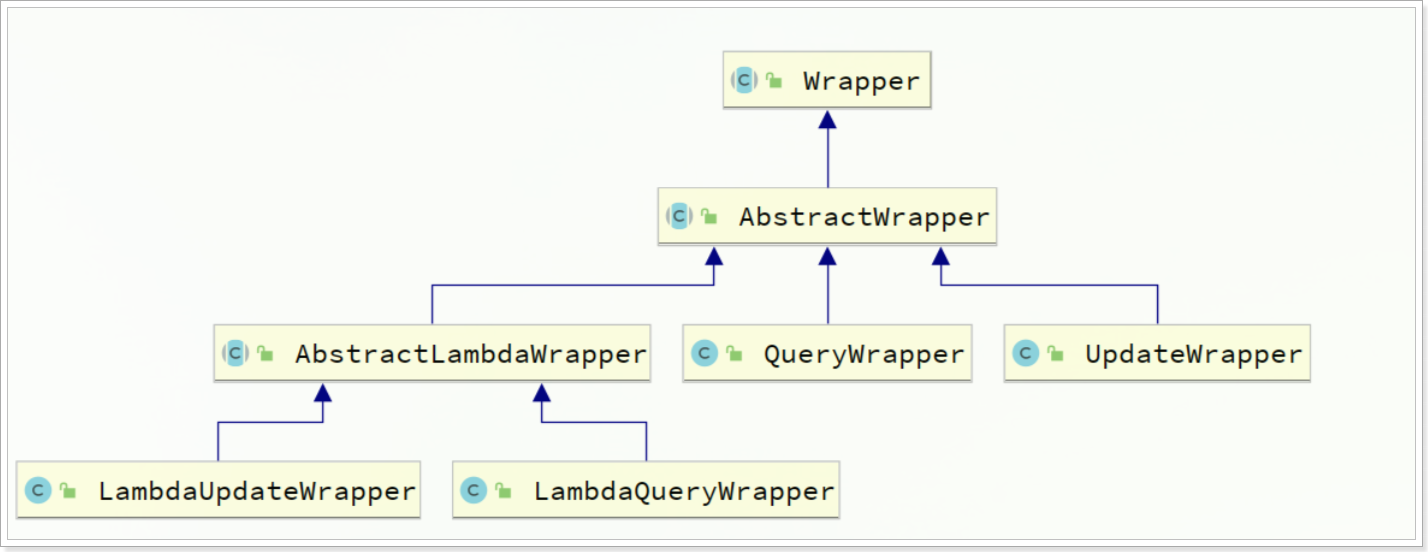
Wrapper抽象类下的实现类如下:
QueryWrapper
 1
 2
 3
 4
 5
 6
 7
 8
 9
10
11
12
13
14
15
|
@Autowired
private UserMapper userMapper;

@Test
public void testQueryWrapper1() {
  QueryWrapper<User> queryWrapper = new QueryWrapper<>();
  // 1、查询
  queryWrapper.select("id", "username", "info", "balance").like("username", "o").ge("balance", 1000);
  List<User> list = userMapper.selectList(queryWrapper);
  // 2、更新
  queryWrapper.eq("username", "jack");
  User user = new User();
  user.setBalance(2000);
  userMapper.update(user, queryWrapper);
}
|
UpdateWrapper
 1
 2
 3
 4
 5
 6
 7
 8
 9
10
11
12
13
14
|
@Autowired
private UserMapper userMapper;

@Test
public void testUpdateWrapper(){
  //1、构造更新条件对象
  UpdateWrapper<User> updateWrapper = new UpdateWrapper<>();
  // set balance = balance - 200
  updateWrapper.setSql("balance = balance - 200");
  // where id in (1,2,4)
  updateWrapper.in("id", 1, 2, 4);
  //2、更新
  userMapper.update(null, updateWrapper);
}
|
LambdaQueryWrapper
 1
 2
 3
 4
 5
 6
 7
 8
 9
10
11
|
@Test
public void testLambdaQueryWrapper() {
  //1、构造查询条件;构造 where username like 'o' and balance >= 1000
  LambdaQueryWrapper<User> queryWrapper = new LambdaQueryWrapper<>();
  queryWrapper.
    select(User::getId, User::getUsername, User::getInfo, User::getBalance)
    .like(User::getUsername, "o")
    .ge(User::getBalance, 1000);
  //2、查询
  List<User> list = userMapper.selectList(queryWrapper);
}
|
自定义sql
UPDATE user SET balance = balance - 200 where id in "1,2,4";
UserServiceImpl
1
2
3
4
5
6
7
8
9
|
@Test
public void testCustomWrapper(){
  //1、构造更新条件对象
  QueryWrapper<User> queryWrapper = new QueryWrapper<>();
  queryWrapper.in("id", 1, 2, 4);

  //2、更新; 调用自定义的更新方法,传入更新数值与查询条件对象
  userMapper.updateBalanceByWrapper(200, queryWrapper);
}
|
UserMapper
1
2
|
@Update("UPDATE user SET balance = balance - #{amount} ${ew.customSqlSegment}")
void updateBalanceByWrapper(@Param("amount") int amount, @Param("ew") QueryWrapper<User> queryWrapper);
|
Service接口
Service接口,封装了一些常用的service模板方法。
save新增
save是新增单个元素saveBatch是批量新增saveOrUpdate是根据id判断,如果数据存在就更新,不存在则新增saveOrUpdateBatch是批量的新增或修改
remove删除
removeById:根据id删除removeByIds:根据id批量删除removeByMap:根据Map中的键值对为条件删除remove(Wrapper):根据Wrapper条件删除
update修改
updateById:根据id修改update(Wrapper):根据UpdateWrapper修改,Wrapper中包含set和where部分update(T,Wrapper):按照T内的数据修改与Wrapper匹配到的数据updateBatchById:根据id批量修改
get查询
getById:根据id查询1条数据getOne(Wrapper):根据Wrapper查询1条数据getBaseMapper:获取Service内的BaseMapper实现,某些时候需要直接调用Mapper内的自定义SQL时可以用这个方法获取到Mapper
list集合
listByIds:根据id批量查询list(Wrapper):根据Wrapper条件查询多条数据list():查询所有
count计数
count():统计所有数量count(Wrapper):统计符合Wrapper条件的数据数量
使用
IUserService.java
1
2
|
public interface IUserService extends IService<User> {
}
|
UserServiceImpl.java
1
2
3
|
@Service
public class UserServiceImpl extends ServiceImpl<UserMapper, User> implements IUserService {
}
|
Lambda查询
 1
 2
 3
 4
 5
 6
 7
 8
 9
10
11
12
13
14
15
16
|
@ApiOperation("根据查询条件userQuery 查询用户列表")
@PostMapping("/list")
public List<UserVO> queryList(@RequestBody UserQuery userQuery) {
  String userName = userQuery.getName();
  Integer status = userQuery.getStatus();
  Integer minBalance = userQuery.getMinBalance();
  Integer maxBalance = userQuery.getMaxBalance();
  LambdaQueryWrapper<User> queryWrapper = new QueryWrapper<User>().lambda()
    .like(StrUtil.isNotBlank(userName), User::getUsername, userName)
    .eq(status != null, User::getStatus, status)// status != null动态判断,是否增加这个where条件
    .ge(minBalance != null, User::getBalance, minBalance)
    .le(maxBalance != null, User::getBalance, maxBalance);

  List<User> userList = userService.list(queryWrapper);
  return BeanUtil.copyToList(userList, UserVO.class);
}
|
Lambda查询优化
 1
 2
 3
 4
 5
 6
 7
 8
 9
10
11
12
13
14
15
16
17
18
19
|
@ApiOperation("根据查询条件userQuery 查询用户列表")
    @PostMapping("/list")
    public List<UserVO> queryList(@RequestBody UserQuery userQuery) {
        String userName = userQuery.getName();
        Integer status = userQuery.getStatus();
        Integer minBalance = userQuery.getMinBalance();
        Integer maxBalance = userQuery.getMaxBalance();
        // Lambda查询优化
        //改造为service中的lambdaQuery()
        List<User> userList = userService.lambdaQuery()
                .like(StrUtil.isNotBlank(userName), User::getUsername, userName)
                .eq(status != null, User::getStatus, status)
                .ge(minBalance != null, User::getBalance, minBalance)
                .le(maxBalance != null, User::getBalance, maxBalance)
                .list(); // 返回集合结果
      					// .one():最多1个结果
      					// .count():返回计数结果
        return BeanUtil.copyToList(userList, UserVO.class);
    }
|
Lambda更新
 1
 2
 3
 4
 5
 6
 7
 8
 9
10
11
12
13
14
15
16
17
18
19
20
21
22
|
@Override
public void deductBalance(Long id, Integer amount) {
  //1、查询用户
  User user = this.getById(id);
  //2、判断状态
  if (user == null || user.getStatus() == 2) {
    throw new RuntimeException("用户状态异常");
  }
  //3、判断余额
  if (user.getBalance() < amount) {
    throw new RuntimeException("用户余额不足");
  }
  //4、扣减余额
  //baseMapper.deductBalance(id, amount);
  int remainBalance = user.getBalance() - amount;
  this.lambdaUpdate()
    .set(User::getBalance, remainBalance) //更新余额
    .set(remainBalance == 0, User::getStatus, 2) //动态判断,是否更新status
    .eq(User::getId, id)
    .eq(User::getBalance, user.getBalance()) // 乐观锁
    .update();
}
|
批量新增
 1
 2
 3
 4
 5
 6
 7
 8
 9
10
11
12
13
14
15
|
//批量插入
@Test
public void testSaveBatch() {
  long begin = System.currentTimeMillis();
  List<User> list = new ArrayList<>(1000);
  for (int i = 1; i <= 10000; i++) {
    list.add(buildUser(i));
    if (i % 1000 == 0) {
      userService.saveBatch(list);
      list.clear();
    }
  }
  long end = System.currentTimeMillis();
  System.out.println("耗时:" + (end - begin) + "ms");
}
|
为了将userService.saveBatch(list);多条SQL合并为一条,我们需要配置rewriteBatchedStatements设置为true
MySQL的客户端连接参数中有这样的一个参数:rewriteBatchedStatements。顾名思义,就是重写批处理的statement语句。
这个参数的默认值是false,我们需要修改连接参数,将其配置为true。
修改application.yaml文件
1
2
3
4
5
6
|
spring:
  datasource:
    url: jdbc:mysql://127.0.0.1:3306/mp?useUnicode=true&characterEncoding=UTF-8&autoReconnect=true&serverTimezone=Asia/Shanghai&rewriteBatchedStatements=true
    driver-class-name: com.mysql.cj.jdbc.Driver
    username: root
    password: root
|
静态工具类
MybatisPlus提供一个静态工具类Db,为了解决,Service之间相互调用,从而出现循环依赖的问题
1
2
3
4
5
6
|
User user = Db.getById(1L, User.class);

 List<User> userList = Db.lambdaQuery(User.class)
                .like(User::getUsername, "o")
                .ge(User::getBalance, 1000)
                .list();
|
枚举类型处理器
帮我们把枚举类型与数据库类型自动转换。
定义枚举类
 1
 2
 3
 4
 5
 6
 7
 8
 9
10
11
12
13
14
15
|
@Getter
public enum UserStatus {
    NORMAL(1, "正常"),
    FREEZE(2, "冻结");

    @EnumValue //枚举中的哪个字段的值作为数据库值
    private Integer code;
    @JsonValue //标记JSON序列化时展示的字段
    private String message;

    UserStatus(Integer code, String message) {
        this.code = code;
        this.message = message;
    }
}
|
修改dto与vo
1
|
private UserStatus status;
|
配置枚举处理器
1
2
3
|
mybatis-plus:
  configuration:
    default-enum-type-handler: com.baomidou.mybatisplus.core.handlers.MybatisEnumTypeHandler
|
测试
1
2
3
4
5
|
@Test
void testSelectById() {
  User user = userMapper.selectById(5L);
  System.out.println("user = " + user);
}
|
结果如下:
1
2
3
4
5
6
|
username="luck"
status={UserStatus@11451}FREEZE
	code={Integer}2
	message="冻结"
	name="FREEZE"
	ordinal=1
|
Json类型处理器
为了解决我们存储的字段是json类型,从数据库手动转换为对象,写入数据库时,将对象手动转为String的麻烦问题。
定义实体类
1
2
3
4
5
6
7
8
9
|
@Data
public class UserInfo {
    //年龄
    private Integer age;
    //简介
    private String intro;
    //性别
    private String gender;
}
|
使用类型处理器
1
2
3
4
5
6
7
|
@TableName(value="user",autoResultMap=true)
public class User{
  private Long id;

  @TableField(typeHandler=JacksonTypeHandler.class)
  private UserInfo info;
}
|
分页
分页拦截器
 1
 2
 3
 4
 5
 6
 7
 8
 9
10
11
12
13
14
15
16
17
|
import com.baomidou.mybatisplus.annotation.DbType;
import com.baomidou.mybatisplus.extension.plugins.MybatisPlusInterceptor;
import com.baomidou.mybatisplus.extension.plugins.inner.PaginationInnerInterceptor;
import org.springframework.context.annotation.Bean;
import org.springframework.context.annotation.Configuration;

@Configuration
public class MybatisConfig {

    //配置Mybatis plus分页拦截器
    @Bean
    public MybatisPlusInterceptor mybatisPlusInterceptor() {
        MybatisPlusInterceptor interceptor = new MybatisPlusInterceptor();
        interceptor.addInnerInterceptor(new PaginationInnerInterceptor(DbType.MYSQL));
        return interceptor;
    }
}
|
使用
 1
 2
 3
 4
 5
 6
 7
 8
 9
10
11
12
13
14
15
|
//测试分页
@Test
public void testQueryPage() {
  Page<User> p = new Page<>(2, 2);
  //根据balance字段升序排列
  p.addOrder(new OrderItem("balance", true));
	Page<User> page = userService.page(p);
  //总记录数
  System.out.println("总记录数:" + page.getTotal());
  //总页数
  System.out.println("总页数:" + page.getPages());
  for (User user : page.getRecords()) {
    System.out.println(user);
  }
}
|